
Let’s share some ideas on launching that beautiful site you created with your team or your company. We don’t want to let all that hard work go to waste now do we.

1. Define your goals
First things first, understand why you made the site in the first place. Was it a KPI requirement? What exactly did the KPI specify – build your launch around that measurement. Document the objectives and purpose of it in your communications. Specify what issues it solves, the benefits it brings, and the specific peeps in your department it caters to.
2. Develop a communication plan
Create a communication strategy to spread the word about your SharePoint site. You can use traditional email, a news page sent from the site, department meetings, eye-catching posters to create awareness, or WhatsApp messages if you have that. Decide on the intervals and lead time. We recommend sending weekly teaser campaigns commencing at least 4 weeks before launch.
3. Create engaging content
Populate your SharePoint site with content that’s valuable and relevant to your department. Share news updates, policies, forms, FAQs, and resources that cater to your department’s unique needs. Make sure some of the content is interactive, that staff would need to click on to do complete a specific task, like book travel or leave.
4. Design an intuitive user interface
Make sure your SharePoint site has pretty and user-friendly interface. Keep things organized and uncluttered. Create clear navigation menus; these are really important to allow users to navigate to important content. Use modern visuals that’ll make your users feel right at home, (get inspiration from the SharePoint Lookbook).
5. Provide training and support
Host training sessions to familiarize your department with SharePoint’s features and functionality. Be there to offer ongoing support, provide FAQs, user guides, and have a dedicated help desk or go-to person for any questions or issues that arise.
6. Encourage collaboration and participation
Highlight the power of collaboration on SharePoint. Encourage users to contribute content, give feedback, and join in discussions. Share success stories and give props to those who actively participate on the site.
7. Leverage SharePoint features
Showcase the cool features of SharePoint that can benefit your department. From document co-authoring, to task management, centralised data and pages. Show them how it can streamline processes and boost productivity in their day to day working lives.
8. Conduct promotional events
Organize exciting in person or online launch events to introduce your SharePoint site. Show off its key features, do live demos, and address any questions or concerns from your colleagues.
9. Gather feedback and iterate
Encourage users to share their thoughts on the site’s usability, content, and functionality. Regularly review their feedback and make improvements to keep your SharePoint site relevant and valuable for your department.
10. Keep Stats
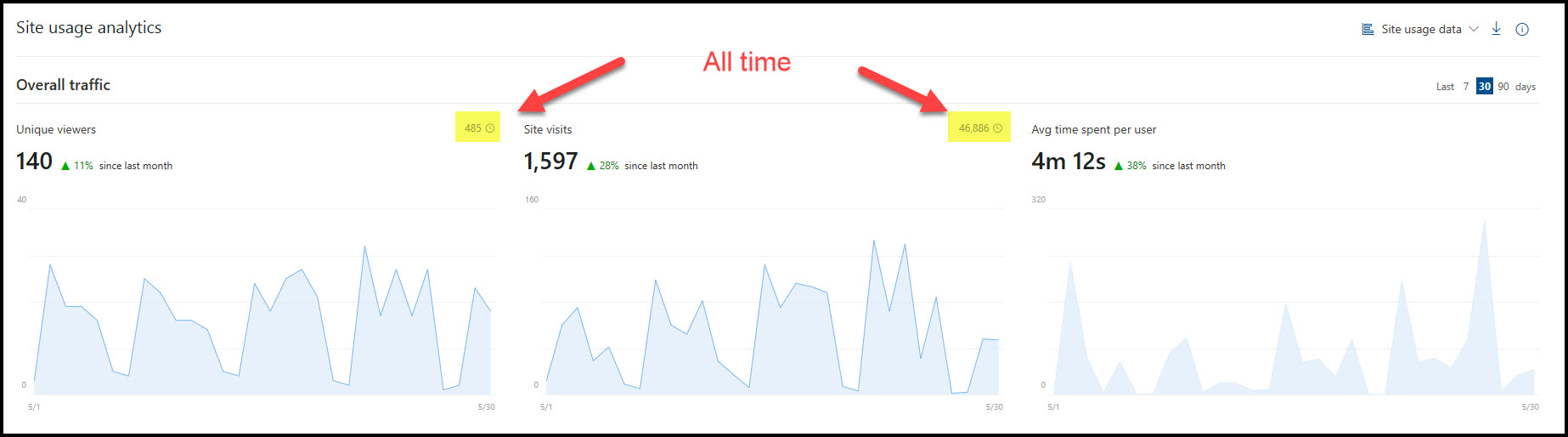
Take screenshots of the usage stats on a monthly basis to track the adoption rate of each site. Use this as your body of evidence in your KPI’s. We use the Site Usage Data for the past 30 days as a measurement baseline in all our intranets. Take note of the spikes in usage – check what communications went out that day, and do more of that.
 Views from Veronique